Meesho Profit Calculator
Your Meesho profit or loss, from the payment file itself — settlement, costs, ads and per-SKU margin.
- 100% free
- No login
- Files never leave your device
Where to find this file
Open panel- Supplier panel
- Payments
- Download
- Payments to Date
- Pick your dates
It downloads as *_PAYMENT_FILE_*.xlsx. Those dates are payment dates, not order dates, so the file usually holds orders placed weeks earlier.
What it works out
The profit and loss statement the Meesho panel does not give you: what you earned, what it cost, and the margin left on every SKU.
- Reads the real payout
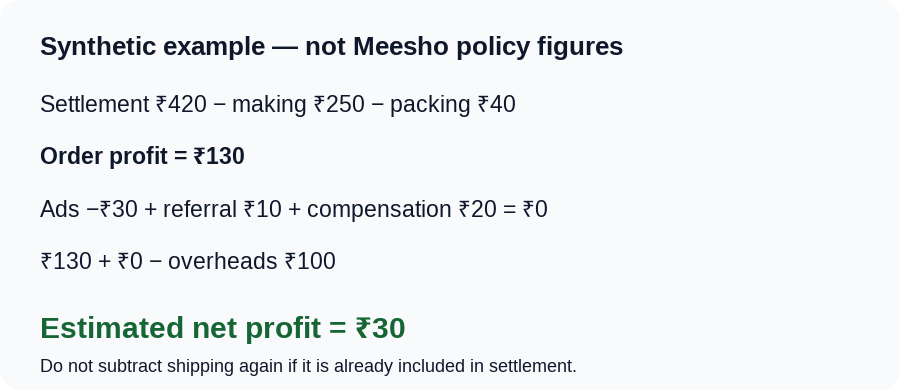
- Starts with Final Settlement Amount from the file. Do not subtract a deduction again if that settlement already includes it.
- Counts every settlement leg
- Meesho splits some orders across two rows, the second with a blank status. Those adjustment rows are included, not dropped.
- Subtracts ads spend
- Campaign spend is an account-level cost and is deducted from net profit rather than quietly ignored.
- Per-SKU margin
- Add your making and packaging cost once and see which products actually earn, and which ones only look busy.
- Handles RTO and returns
- Set how much of an RTO or return you really lose, so profit reflects what happened, not a best case.
- Charts that show the leak
- A breakdown of where every rupee went, how your orders ended up, and which SKUs make or lose the most.
- Costs in and out as Excel
- Export every SKU to a spreadsheet, fill the costs in Excel, and import it back — no typing them one by one.
- Private by design
- Your payment file is parsed in the browser. It is never uploaded, and your SKU costs stay on your device.
Which file do I upload?
In the Meesho supplier panel, open Payments, press Download and choose Payments to Date, then pick the period you want. It arrives as a *_PAYMENT_FILE_*.xlsx spreadsheet, and that one file is everything the calculator needs.
The same Download button also offers GST Report, Tax Invoice, Supplier Tax Invoice and Outstanding Payments. None of those carry the per-order settlement rows, so the calculator can't read them — it is specifically Payments to Date you want.
The dates in the file name are payment dates, not order dates, so a file usually includes orders placed weeks earlier. You can add more than one payment file at once to cover a longer stretch.
Just sorted your labels? The Meesho label cropper handles the packing side of the same batch.
Not listed yet, or setting a price for a new product? The Meesho price calculator works out profit and margin from a cost and a selling price, with no payment file needed.
Reconcile settlement and account adjustments
Read the deductions recorded in your own file. Start with settlement and reconcile account adjustments separately; do not subtract the same cost twice.
- Commission
- Read the commission entry, if present, in your own report and verify the applicable rate in your account. No universal rate is assumed here.
- Shipping charge
- Use the shipping amounts recorded in your report. Do not add a cost again if it is already included in settlement.
- GST and TCS/TDS
- Check the tax labels and amounts in your file against your account records. This tool does not calculate or verify statutory rates.
- Return and RTO charges
- Use the recorded return deductions and choose stock-loss assumptions separately. Returned stock may be partly or fully resellable.
- Ads spend
- The supported Ads Cost sheet supplies a signed account adjustment. Avoid adding the same campaign spend again as an expense.
- Compensation and recovery
- The supported compensation and recovery sheet supplies signed account adjustments; positive and negative amounts affect profit accordingly.
And what it doesn't know about
Meesho can report what it paid you. It cannot report profit, because none of this is visible to it — and this is exactly the gap the calculator asks you to fill in:
- What each item cost you to make or buy
- Packaging material and tape
- Labels, ink, and printer paper
- Rent, electricity and internet
- Salaries, including your own
- Stock written off after a return comes back unsellable
Guides on payments and margin
Where the settlement figure comes from, and what it leaves out.
- Getting startedMeesho payment file download and supported formatsFind the settlement workbook your Meesho profit calculator needs. Required sheet layout, accepted Excel formats and common import mistakes.
- Payments & profitWhy your Meesho payment is less than the order valueHow to reconcile Meesho settlement rows, avoid double-counting deductions and include product, packing, returns and overheads in profit.
- Payments & profitWhat RTO means on Meesho, and what it costs a sellerRTO on Meesho means Return to Origin — an order that came back without being delivered. How it differs from a customer return, and what each one costs you.
- GlossaryMeesho seller terms, explained in plain wordsAWB, SKU, RTO, settlement, pick list, TCS, ADS — what each term on your Meesho labels and payment file means, and which ones cost you money.
Meesho profit, answered
What sellers ask most about payments, settlements and margin.