Payments & profit
Meesho profit calculation — a synthetic settlement example
A worked payment-file profit example with delivered orders, RTO, customer returns, product costs, ads and overheads. Synthetic figures only.
Written by SellerWala · Editorial method
Updated
Start from settlement, subtract costs by order outcome, add signed account adjustments, then subtract overheads. The example below uses invented figures to explain SellerWala’s calculation. They are not Meesho fees, policy rates or a real seller’s results.
Synthetic order rows
Each order has one unit. Product making cost is ₹100 and packing cost ₹10 per shipped unit. Assume RTO product loss 0%, customer-return product loss 50% and packaging loss 100% for both. These are choices for this example, not recommended default loss rates.
| Order | Outcome | Net settlement | Making cost lost | Packing used | Order profit |
|---|---|---|---|---|---|
| DEMO-1 | Delivered | ₹250 | ₹100 | ₹10 | ₹140 |
| DEMO-2 | Delivered | ₹230 | ₹100 | ₹10 | ₹120 |
| DEMO-3 | RTO | −₹20 | ₹0 | ₹10 | −₹30 |
| DEMO-4 | Customer return | −₹40 | ₹50 | ₹10 | −₹100 |
| Total | 4 orders | ₹420 | ₹250 | ₹40 | ₹130 |
The negative settlements already include deductions in these invented rows. Do not subtract those same deductions again. A return-shipping column can explain a loss without becoming an additional cost after settlement.
Account adjustments and overheads
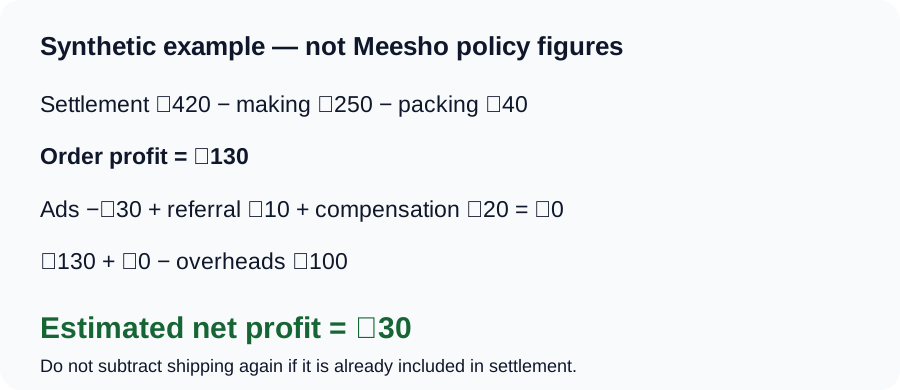
Add a signed −₹30 ads adjustment, ₹10 referral payment and ₹20 compensation. Account adjustments sum to zero in this example:
₹130 − ₹30 + ₹10 + ₹20 = ₹130 before overheads.
Monthly overheads of ₹300 over a 10-day payment window add ₹300 × 10 ÷ 30 = ₹100. SellerWala’s expense proration uses a 30-day month. Final estimated net profit is ₹130 − ₹100 = ₹30.
Reproduce it in the tool
Use a supported payment workbook with synthetic rows, enter making cost ₹100 and packing ₹10 for the example SKU, and choose the loss assumptions above. Check the payment-file format guide before constructing a sample. The payment-file tool has its own editable loss defaults; change them to reproduce this example.
If an order has several payment legs, the tool groups its Sub Order No, sums the settlement legs and resolves its status using the supported status-priority rules. Units are not the same as payment rows. Overlapping files are handled separately from multiple legitimate adjustments within one file.
Forecast versus settled profit
The price calculator forecasts listing profit from rates you enter and assumes returns are resellable. The payment-file calculator starts with actual settlement and editable product-loss assumptions. Different inputs and periods can legitimately produce different answers.
Read shipping and return deductions before adding expenses, and RTO meaning and cost to distinguish undelivered parcels from customer returns. Use the glossary for other terms.
Sources and verification
Tool behavior and examples checked: . Marketplace policy rates are published only with verified official evidence.
Read next
- Getting startedMeesho payment file download and supported formatsFind the settlement workbook your Meesho profit calculator needs. Required sheet layout, accepted Excel formats and common import mistakes.
- Payments & profitMeesho shipping and return deductions — read your payment fileRead settlement and return-shipping columns without inventing universal fees or double-counting deductions in your Meesho profit estimate.
- Payments & profitWhat RTO means on Meesho, and what it costs a sellerRTO on Meesho means Return to Origin — an order that came back without being delivered. How it differs from a customer return, and what each one costs you.