Printing
Meesho label size — 4x6, 3x5 or A4, and which to print on
What size a Meesho shipping label is, why the downloaded file is A4, and which label size to pick for a thermal printer or ordinary A4 paper.
Written by SellerWala · Editorial method
Updated
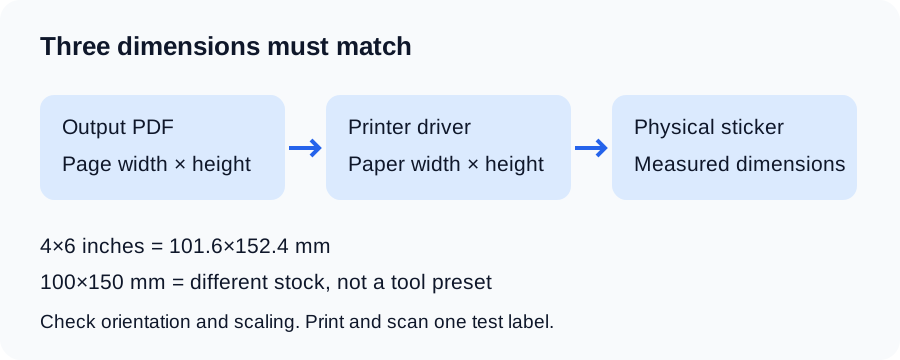
A label’s PDF page size, driver paper size and physical sticker size must match. Measure the stock rather than treating inch and metric names as interchangeable.
Exact dimensions
| Output preset | PDF dimensions | Use with |
|---|---|---|
| 4×6 inches | 101.6×152.4 mm | Stock measured as 4×6 inches |
| 100×150 mm stock | No exact output preset | Different from the 4×6-inch output |
| 3×5 inches | 76.2×127 mm | Stock measured as 3×5 inches |
| A4, 1 / 2 / 4 labels | Approximately 210×297 mm | An A4 sheet, with labels arranged in cells |
4×6 inches and 100×150 mm are close, but different. The label cropper defaults to exact 4×6 inches. There is no exact 100×150 mm output preset. Match stock to the available PDF dimensions. Existing saved inch settings keep their dimensions.
Source size is different from output size
Supported Meesho PDFs place the shipping label above the tax invoice. The boundary can move with layout and item count; it is not a promise of two equal halves. Cropping removes the invoice and composes the remaining label into the selected output page. Preview the first page and inspect a varied batch before printing it all.
Use the crop walkthrough for download → crop → print, or the invoice guide if you need to retain invoices.
Choose and check a preset
- Measure one sticker’s printable width and height.
- Choose that size in the cropper.
- Confirm the generated PDF page dimensions in your PDF reader.
- Set the same stock size in the printer driver and print dialog.
- Start with actual size / 100% and check orientation and margins.
- Print one sample and scan its barcode with the scanner used in your dispatch workflow.
Smaller stock leaves less space for text and barcodes. A 3×5 output is available, but scanning quality depends on the source, scaling, printer and stock. If the sample is unreadable, use a larger supported size and resolve print quality before dispatch.
If the print size is wrong
A small print can be caused by an A4 source, PDF viewer scaling, driver stock selection or margins. A clipped print can also result from orientation or a stock mismatch. Follow small-label troubleshooting before changing calibration. The thermal printer guide covers driver and media setup.
Sources and verification
Tool behavior and examples checked: . Marketplace policy rates are published only with verified official evidence.
Read next
- Getting startedHow to crop a Meesho shipping label to 4x6 (free, online)Meesho gives you an A4 page with the label on top and the invoice below. How to crop the shipping label to 4x6, 3x5 or A4 and print it at the right size.
- PrintingHow to print Meesho labels on a thermal printer4x6 and 3x5 settings for TSC, TVS, Rugtek and Honeywell printers — crop the invoice first, print at 100%, and stop wasting label rolls.
- PrintingMeesho label prints too small — check PDF, scaling and driverFix small Meesho label prints by matching PDF dimensions, sticker stock and driver settings. A step-by-step print and barcode check.