Meesho Label Cropper
Crop the invoice, fit labels to your printer, and sort them the way you pack.
- 100% free
- No login
- Files never leave your device
What you can configure
- Printer type
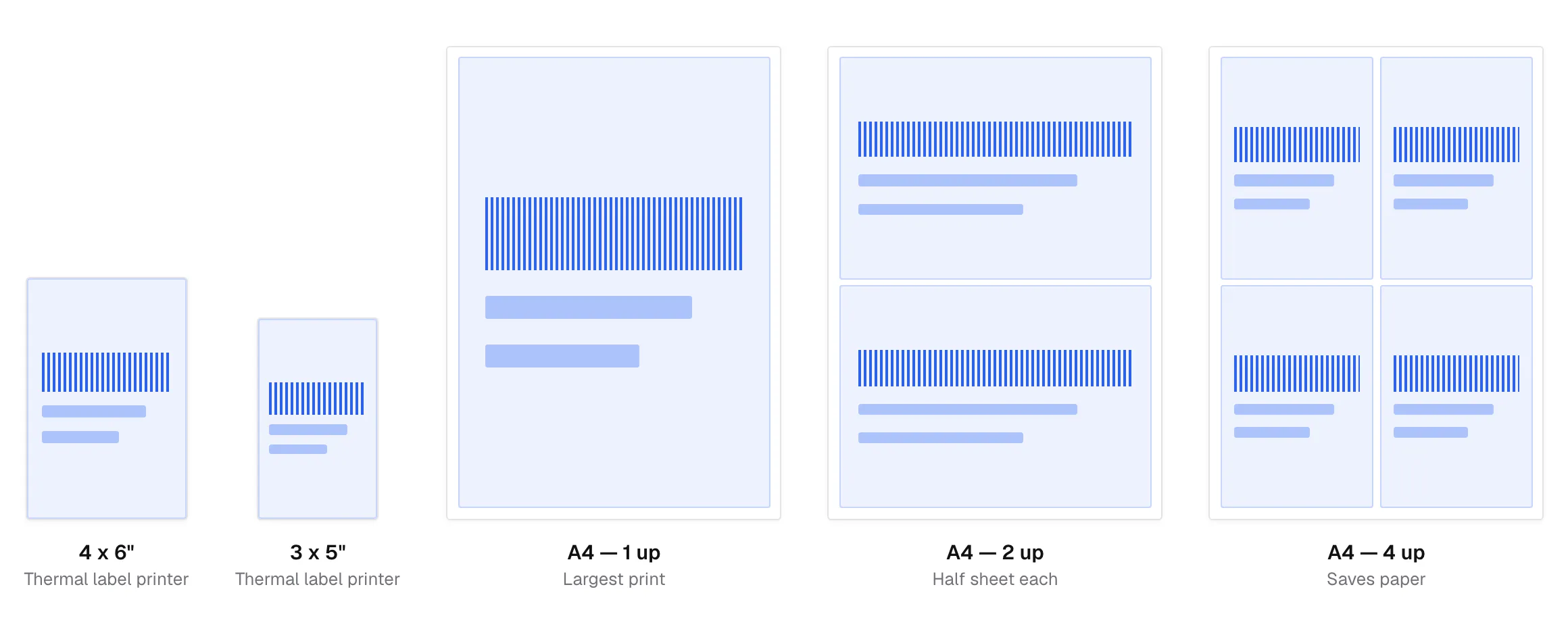
- Label printer (3x5" / 4x6"), or A4 paper with 1, 2, or 4 labels per sheet.
- Invoice handling
- Crop the invoice away, keep it attached, or save invoices as a separate PDF.
- Sort order
- Original order, SKU, courier, pickup hub, or color and size — match how you pack.
- Custom text & order #
- Stamp a note or the order number onto each label.
- SKU order summary
- A downloadable count of every SKU across the batch, for packing.
- Private by design
- Everything runs in your browser — your labels and customer details are never uploaded.
Works with every Meesho courier
The cut line is found by reading the page text for the TAX INVOICEheading, not by slicing at a fixed height. Courier names are read from where they sit on the label rather than matched against a list — so a courier we have never seen still works.
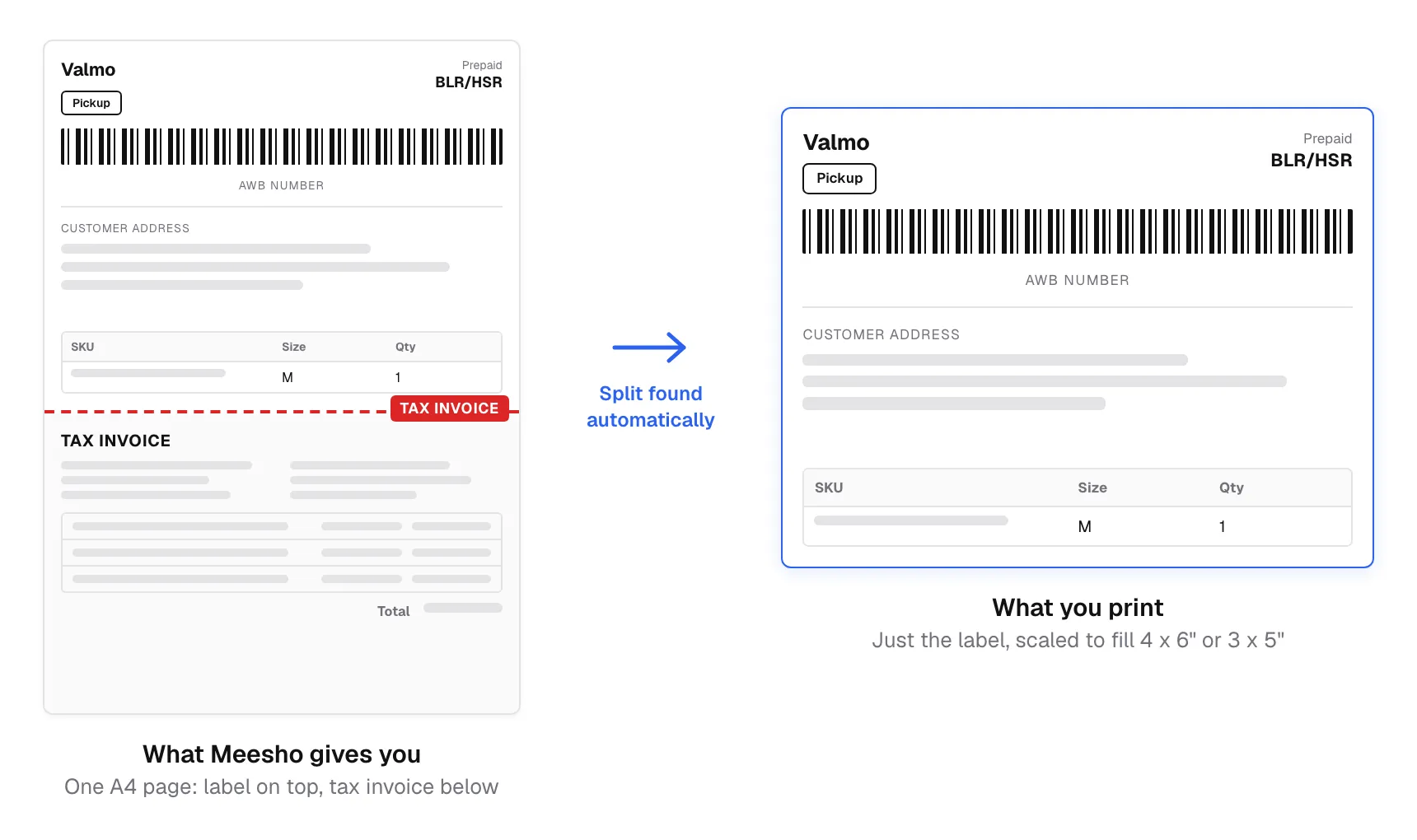
- ValmoMeesho's own logistics arm, now on a large share of orders.
- DelhiveryThe format the boundary detection was first confirmed against.
- ShadowfaxSame label structure, different header art.
- XpressbeesHandled by the same text-anchored crop.
- EkartRecognised without any courier-specific rule.
- Ecom ExpressAnd any other courier Meesho assigns you.
Which printer size should you pick?
4 x 6 inch
The common thermal sizeThe default for most Indian label printers — TSC, TVS, Rugtek, Honeywell and the rest. Output is a PDF with a true 4x6 inch page, so the printer prints it at 100% with no scaling and no margin.
3 x 5 inch
Smaller thermal rollsSame idea at a smaller page size. Pick this only if your roll is genuinely 3x5 — printing a 4x6 label on a 3x5 roll crops it, rather than shrinking it.
A4, 1 / 2 / 4 per sheet
No thermal printer yetPacks cropped labels onto an ordinary A4 sheet with a quarter-inch margin, rotating each label to fill its cell. Four per sheet is the usual choice: cut once across and once down.
What's on a Meesho shipping label
Worth knowing, because these are the fields the cropper can sort and stamp by.
- AWB number
- The 12–20 digit tracking number printed above the barcode. It is what the courier scans, and what your customer types into a tracking page.
- SKU
- Your own product code. The cropper reads it from the product table and can sort the whole batch by it, so identical items come off the printer together.
- Pickup hub
- The courier branch collecting the parcel, printed under the courier name. Sorting by hub groups everything going out on the same van.
- Tax invoice
- The GST invoice Meesho prints on the same page, below the label. It is not part of the shipping label and is what the cropper removes — though you can keep it, or save all invoices into a separate PDF for your records.
Guides for printing and packing
Longer walkthroughs of the parts this page only summarises.
- CouriersMeesho courier partners, and how to pack for each oneValmo, Delhivery, Shadowfax, Xpressbees, Ekart and Ecom Express — how the courier is decided, where it appears on the label, and how to sort your labels by pickup.
- ComparisonsA Meesho label cropper vs a generic online PDF cropperAny PDF site can crop a page. Six things a general-purpose cropper cannot do with a Meesho label file — and the one question worth asking before you upload customer addresses anywhere.
- GlossaryMeesho seller terms, explained in plain wordsAWB, SKU, RTO, settlement, pick list, TCS, ADS — the abbreviations printed on your labels and in your payment file, what each one actually means, and which ones cost you money.
Meesho label cropping, answered
The questions sellers ask most about this tool.
Does it work with Valmo labels?
Will the cropped label print at the right size on my thermal printer?
Can I print Meesho labels without a thermal printer?
How many labels can I crop at once?
Does the tool remove the tax invoice permanently?
Is it safe to upload my customer addresses here?
Got questions?
How the tool works, and why your data stays safe.